Bidsquare Cloud Webinar Recap
Mostrada Destacada
Thanks to everyone who joined our recent Bidsquare Cloud webinar!
We covered the latest features and advancements for Bidsquare Cloud. If you missed it or want to revisit the highlights, take a look at the outline of new features below or watch the recording to get all the details.
Payment & Bidding Controls
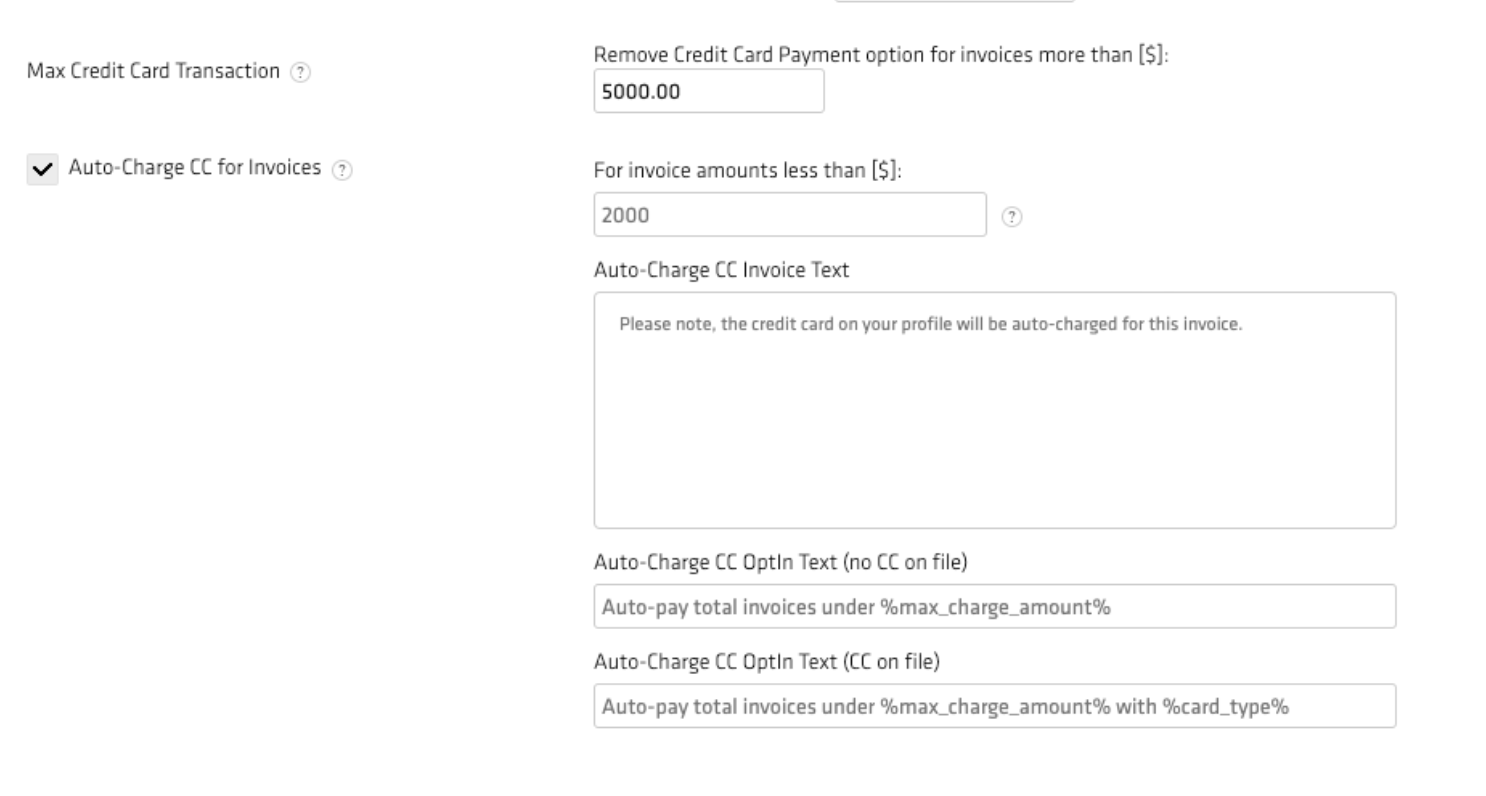
Max Credit Card Transactions - Prevent using a credit card for transactions beyond a certain price
Go to Settings > Auction Settings > Payment & Invoice (scroll down and add the maximum amount), click "Submit".
Unpaid Bidder Limits - Set a bidding limit on any bidders who have no paid invoices
Go to Settings > Auction Settings > Scroll down to field "Bidder bidding limit with no paid invoice", add your default bidding limit, click "Save Changes".
Add Auto-Charge as Mandatory Opt-in - Require users to opt-in to being autocharged for invoices
Enable via Auction Settings > Invoice & Payment > Scroll down and select "Auto-charge CC for Invoices" > Click Submit. This setting must also be enabled at the event level.
Require CC Verification at Registration - Require users to provide a credit card for verification before being able to register for an auction
Send cumulative “You’ve Won” email - Send a single email with all bids a user won instead of individual emails for each winning bid, speak to your rep about enabling this function
Timed Auction Enhancements
Auto extended reset to set value - Allows you to reset the extended time to remaining end time
Disable “Staggered Closing” - You can now disable/enable staggered closing as you choose
Advance bid price up to Reserve price (timed auctions only) - Allows you to advance bids below reserve while keeping the reserve price hidden
Financials - Invoicing & Settlements
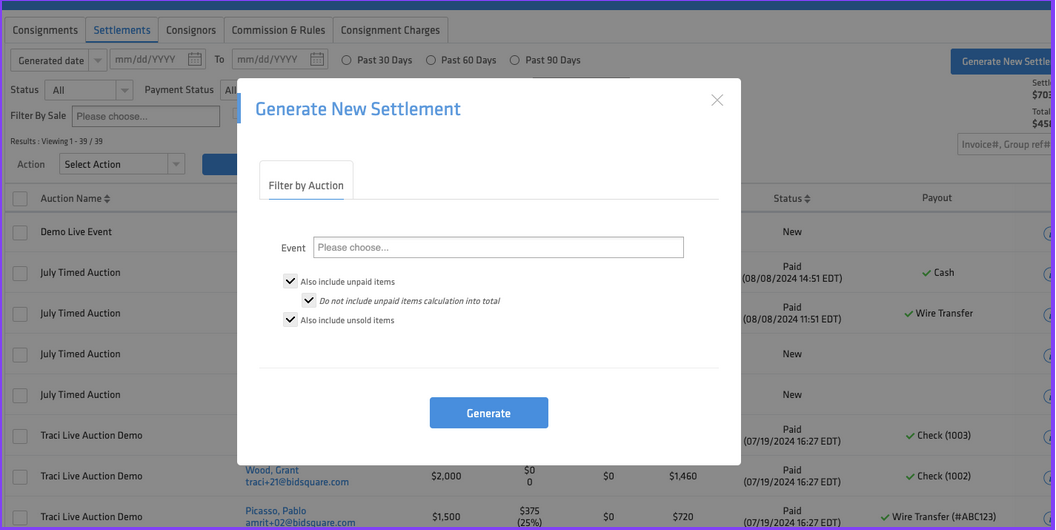
When generating a new settlement, you now have the option "do not include unpaid items in calculation total".
Address Search - Settlements & Invoices have new fields to search by address, city, and state. There is also a filter for states, provinces, and global regions.
Customize Registration, Credit Card, Bid Confirmation, and Sign In Pop Up - You can now customize the content of these pop ups on your site
Go to Settings > Site Settings & Metadata > Scroll down to "Other Site Settings" for customization options.
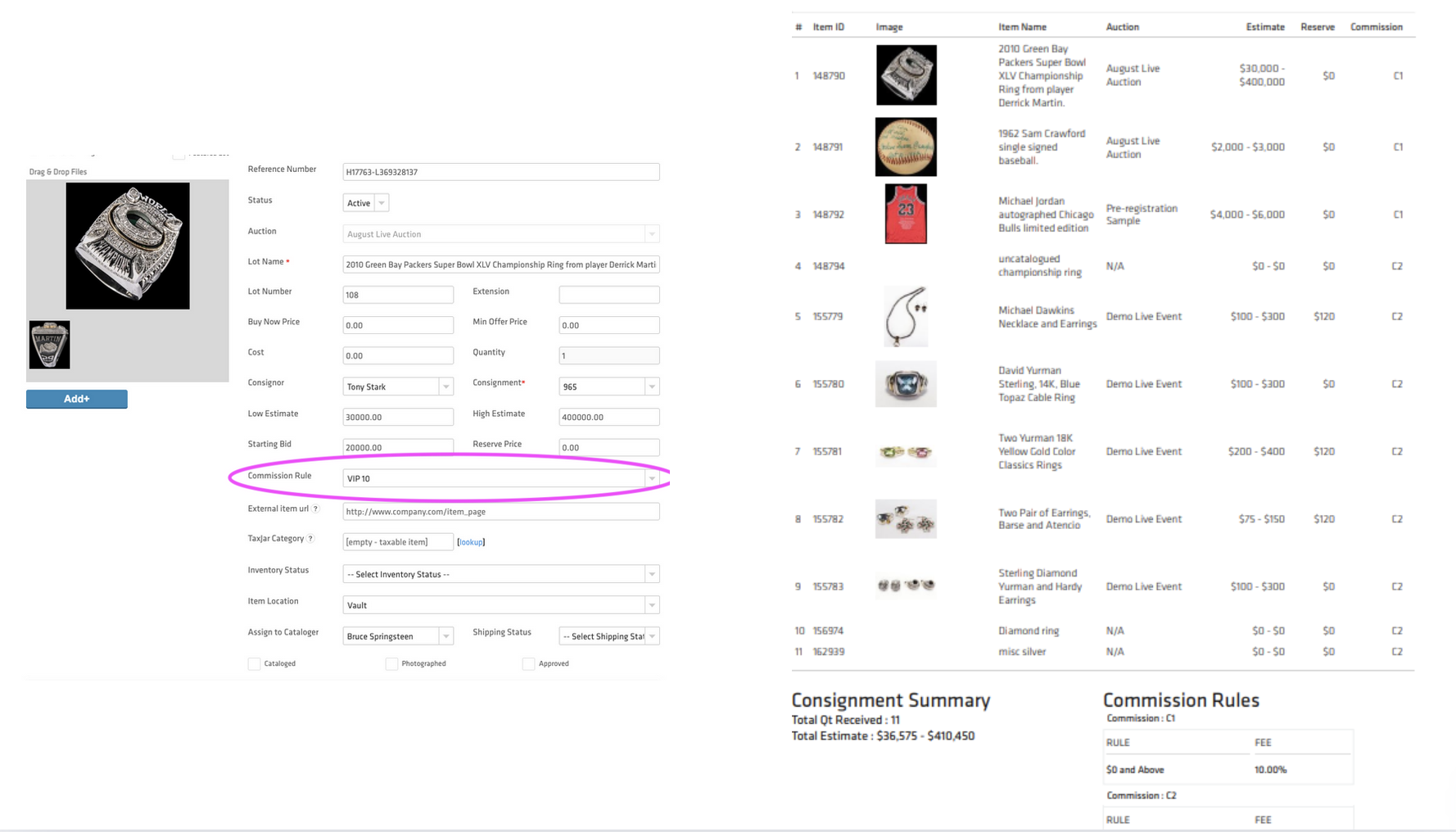
Consignments can support multiple commission rules - Once you create a consignment, you can adjust the commission rule on a per-item basis.
When editing the lot, select "Commission Rule" to give it a different commission rule than the consignment.
Customization & Flexibility
Set default pre-filled text for Item Description, Condition, or Provenance
Go to Settings > Auction Settings > Others > Type your default Provenance or Item Description, click "Save Changes".
Customize the Mandatory Fields on Items, Users, and Consignors
Settings > Field Settings > Select the fields you would like to make mandatory, click "Save".
New Custom Field Type, "Dropdown" - Allows you to create a custom field and create the dropdown field values on an Item, User, Consignor, or Invoice.
Go to Settings > Custom Field > Add Custom Field, you can now select a new custom field type “Dropdown”.
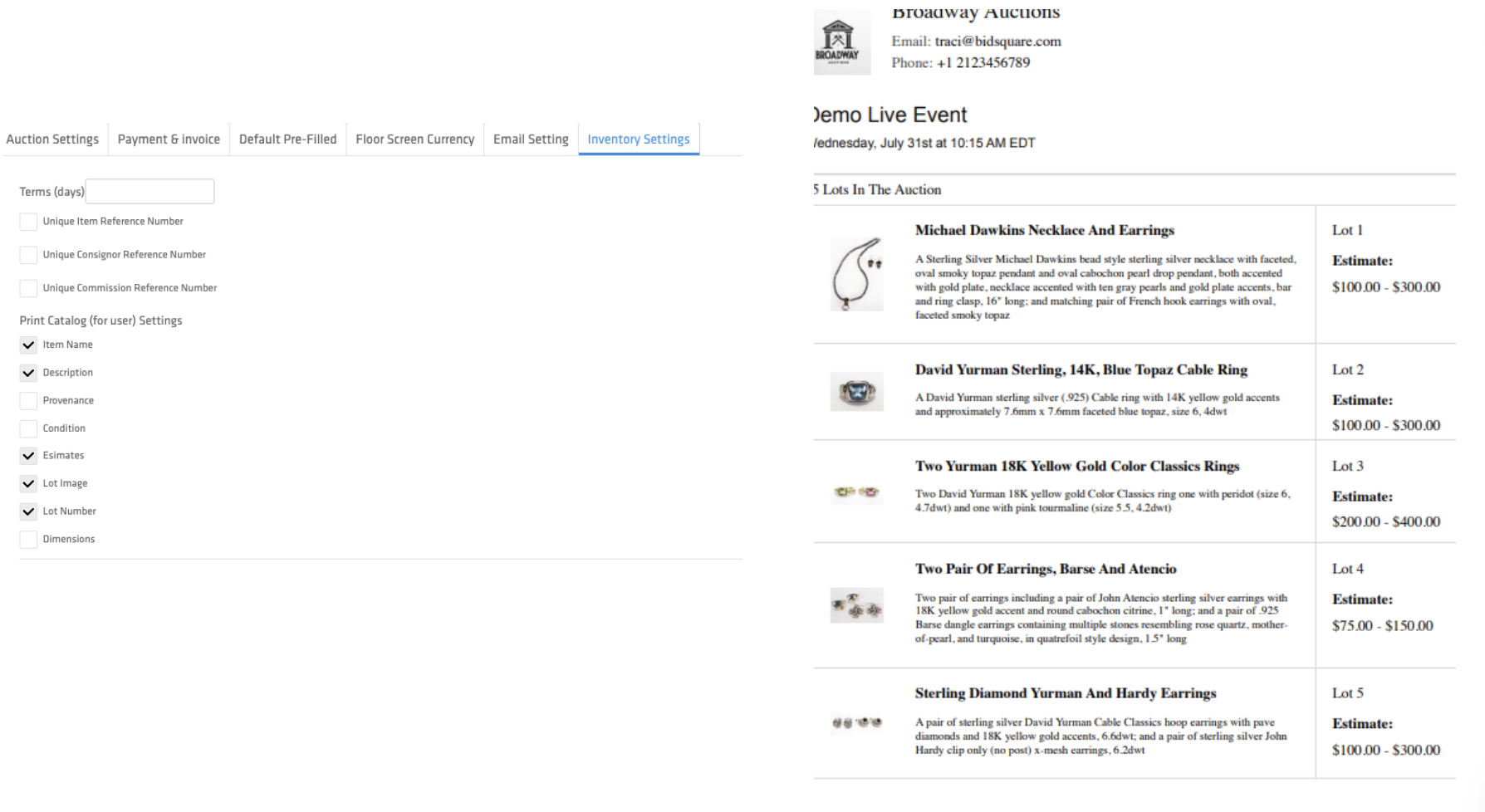
Customize “Print User Catalog” fields - Allows the auction house to select which fields display in the printed user catalog
Go to Settings > Auction Settings > Inventory Settings> Select fields for inclusion under “Print Catalog (for user) Settings”.
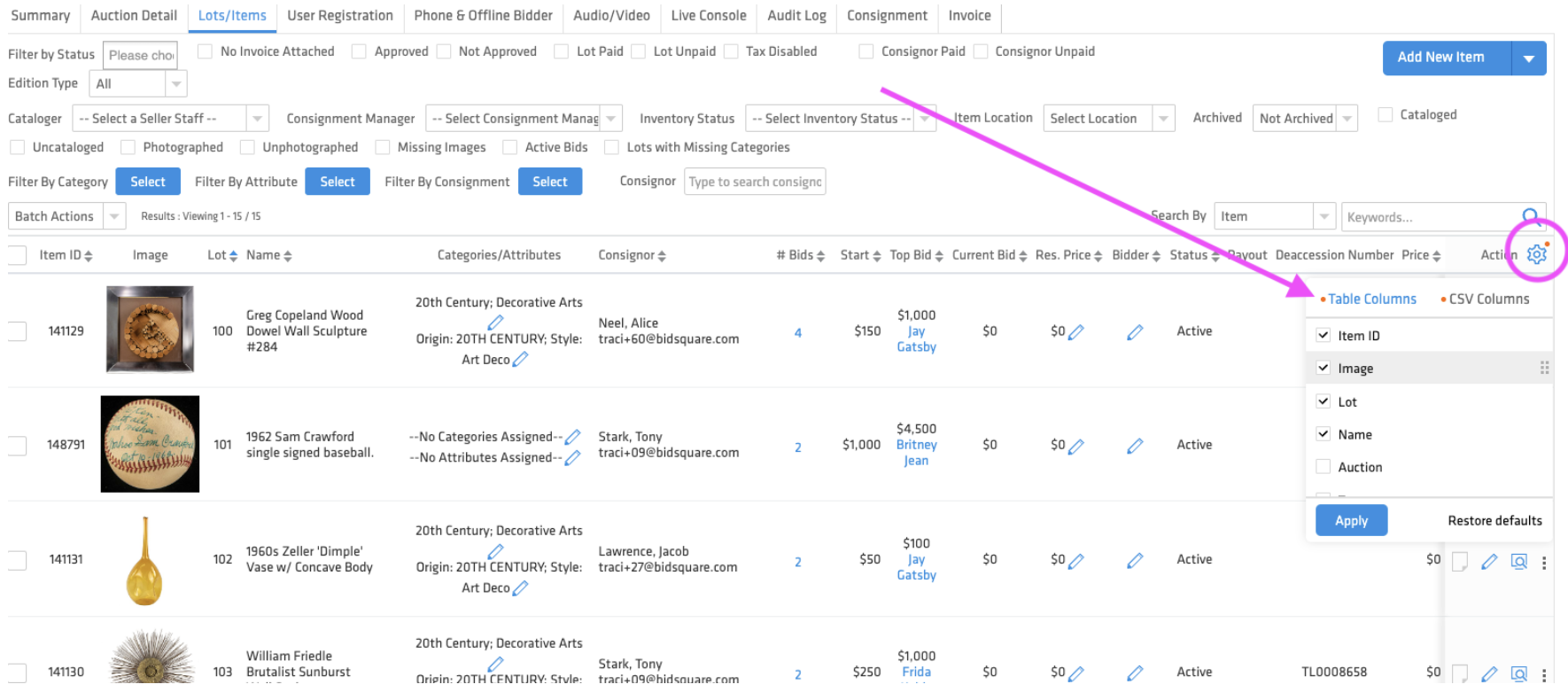
“Gear” icon in the right header column allows you to customize the table view and customize the column export via CSV - Pages include the gear functions, including Lots/Items, Inventory, Users, Consignors, Invoices, and Settlement.
Archived Status - Marking an item as “inactive” will filter out “inactive” / archived inventory
Assign Inventory Item Location - You can now assign a location to an item, either individually or by using “Batch assign item location” option
UI Enhancements
During a live sale with streaming video, the fields for "Description" and "Provenance" can now be viewed on the live bidding page.
Enlarge the video feed window during a live sale with streaming video - For desktop users the video window is now larger and can be dragged/dropped around the screen.
Expandable categories on White-label
Go to Settings > Site Settings & Meta Data> Scroll Down and enable "Show Expandable and Visible Subcategories", click “Submit”
Print paddle number - You can now print out the paddle numbers of your bidders
Auction > User Registration, Select Users > Batch Action, select Print Paddle/ Bidder #".
Disable Winning Bid Notifications - You can now disable individual winning bid emails, which you can replace with the cumulative winning bid email that was mentioned above
Go to Settings > Auction Settings > Select “Disable Winning Bid Notifications > Click Submit.
Mailchimp Registration Integration - Integrate Mailchimp email registration form on your white label site
Go to Settings > Subscribe Settings > Complete Mailchimp & API Key information > Click Submit.
Coming Soon
Vault mobile cataloging app - New mobile app for Vault inventory management
Consignor Login “My Account” - A new login page for your consignors, similar to bidder login
User & Item Activity Tracker - Activity tracer for users, items, and other areas in the system
Configurable Lot Labels - Ability to choose what displays on your lot labels
Recording:
La publicación no admite más comentarios.
Comentarios
0 comentarios